

Add Page Numbers to a PDF: Covers and Landscape
Choose a page number format, skip a cover page, set a start number and check landscape or merged pages, with a tested walkthrough of PDFroo.

Printed double-sided, a 3-page document ends on the front of the second sheet. If the next document follows straight on, its first page is printed on the back of that sheet, and the two get stapled together. The fix is a blank page after every section with an odd number of pages.
| Section | Pages | Blank needed after? |
|---|---|---|
| Doc A | 3 | Yes |
| Doc B | 2 | No (last section) |
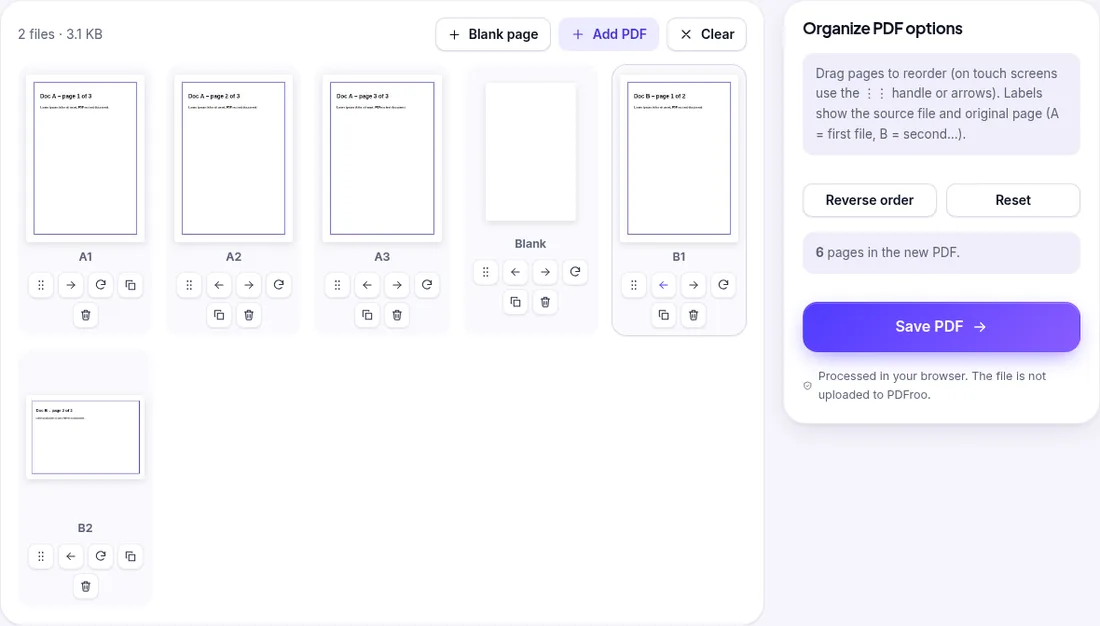
Our output had 6 pages: Doc A pages 1–3, the blank, then Doc B pages 1–2, so Doc B starts on a new sheet.
On 28 October 2026 we repeated the test on the live site with a three-part packet: Doc A (3 pages), Doc B (2 pages, its second page is landscape) and a second copy of Doc A (3 pages), 8 pages in total.
| Section | Pages | Blank needed after? |
|---|---|---|
| Doc A | 3 | Yes |
| Doc B | 2 | No |
| Doc A (copy) | 3 | Only if more is printed after it, or if the packet must end on a full sheet |
We added one blank and moved it to position 4, then added a second blank and left it at the end. The output had 10 pages: A1 A2 A3, blank, B1 B2, A1 A2 A3, blank. Each section now starts on the front of a new sheet, and the packet ends on a complete sheet.
Both inserted blanks were A4 portrait (595 × 842 pt) with no text on them, and the landscape page in Doc B kept its landscape size (842 × 595 pt). The blanks did not take the size of a neighbouring landscape page, so in a mixed packet they still print as ordinary portrait sheets.
| Date | 22 October 2026 |
|---|---|
| Environment | Google Chrome 155 (headless) on Linux x86_64, desktop viewport 1280×900, PDFroo build of 22 October 2026 |
| Test files | Fictional Doc A (3 pages) and Doc B (2 pages) |
| Run | Blank page inserted after Doc A |
| Results | 6 pages in the order A1 A2 A3 blank B1 B2 (checked with pdftotext) |
| Network | The browser made no request that carried the file: the only requests during processing were same-origin page prefetches and local blob: URLs. |
| Re-test | 28 October 2026 on the live site: Doc A + Doc B + Doc A with two blanks → 10 pages in the order A1–A3, blank, B1–B2, A1–A3, blank; blanks A4 portrait with no text; landscape page kept |
During these runs the only POST requests went to the site’s analytics endpoints (Cloudflare Web Analytics and Google Analytics); no request went to a PDFroo processing server, and the result was produced in the browser.
We checked every output with pypdf, pdfinfo and pdftotext, and recorded every network request the page made while the file was processed. See our tool testing methodology.
Choose a page number format, skip a cover page, set a start number and check landscape or merged pages, with a tested walkthrough of PDFroo.
Find pages that repeat after combining PDFs, delete the extra copies, and check the final page count. Tested with overlapping files and a re-scan.
Turn a phone photo of your handwritten signature into a clean, see-through signature on a PDF. We tested six photos: what worked and what left a box.
Prepare a PDF for long-term archiving by checking text, page order, metadata, forms, compression, file naming, backups, and PDF/A requirements.
Learn why black boxes and cropping may not remove PDF data, then follow a safer workflow to redact, flatten, verify, and share sensitive files.
Make a PDF easier to read on a phone by fixing orientation, cropping wide margins, splitting long files, and preserving clear searchable text.