

How to Redact Sensitive Information From a PDF Safely
Learn why black boxes and cropping may not remove PDF data, then follow a safer workflow to redact, flatten, verify, and share sensitive files.
Add Text to PDF is for small changes: fill a form that has no fields, add a note or date, cover a smudge, or highlight a line. It has three modes: Text, White-out and Highlight. It does not edit the PDF’s existing text.
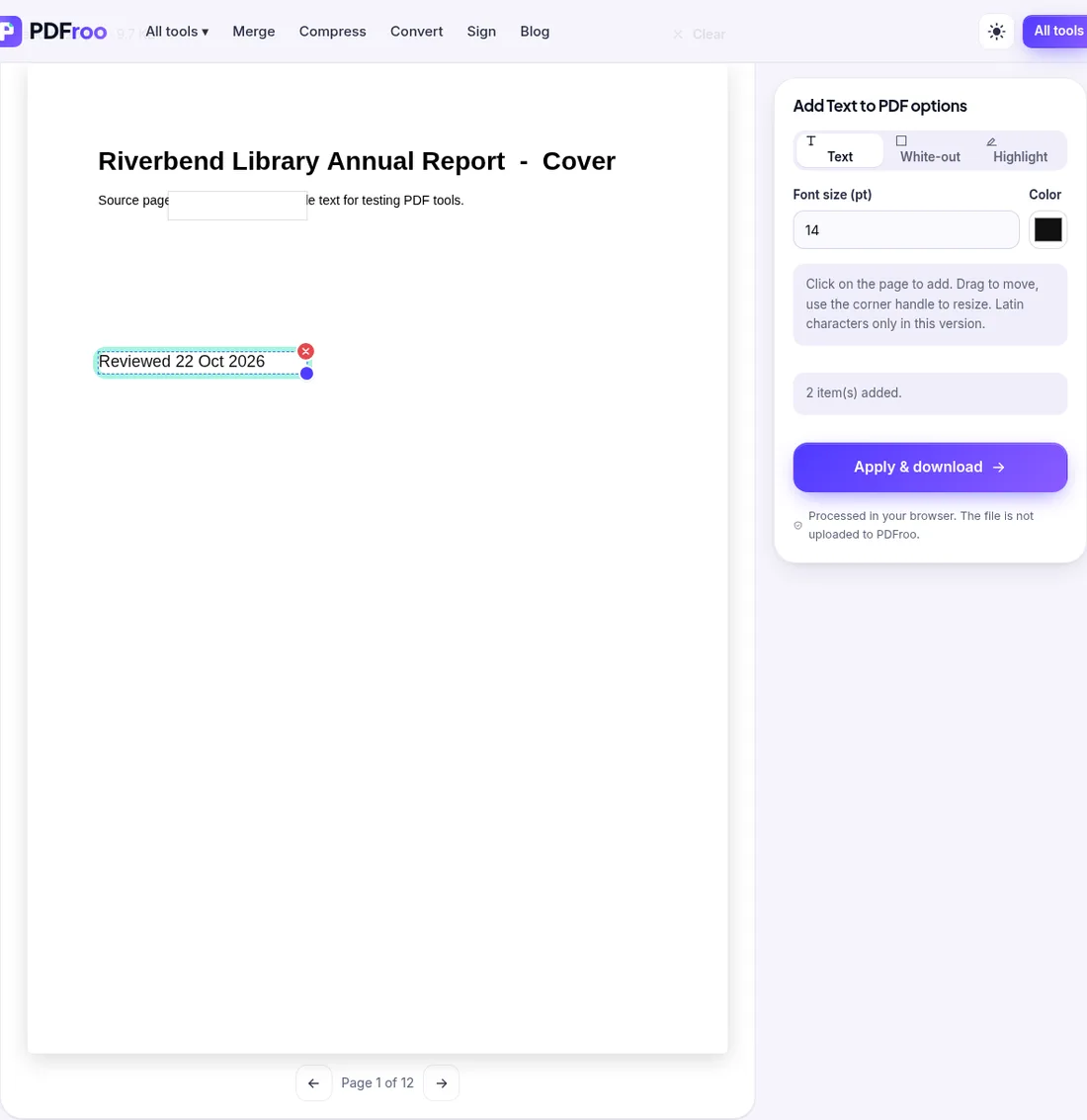
In our test, the white box hid part of the subtitle line when the page was viewed or printed. But pdftotext still extracted the whole line, “Source page 1 of 12. Fictional sample text…”, from the output. Anyone can copy or search the covered words. Use white-out only for cosmetic fixes. To hide private information, follow our redaction guide.
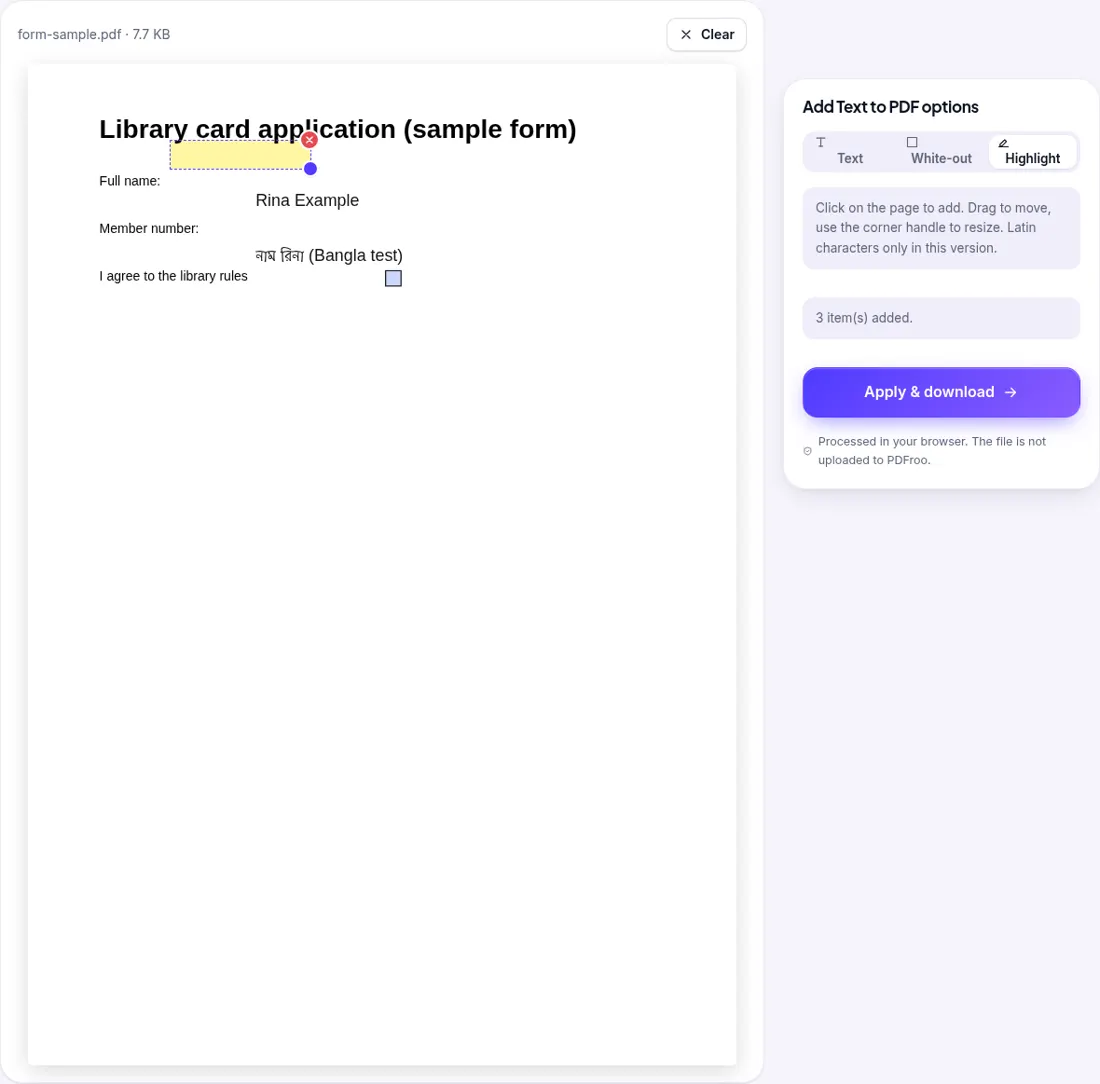
We opened a fictional one-page library card form whose fields were already filled in (“Rina Example”, “RB-00417”) and added a highlight, a typed name and a line in Bangla. Two lessons came out of it:
| Job | Mode | Note |
|---|---|---|
| Write a name or date on a scanned or printed form | Text | Choose font size close to the form’s print (10–12 pt is common) |
| Cover a smudge or stray mark on a scan | White-out | Cosmetic only; text under it can still be copied |
| Correct a typo in printed text | White-out, then Text on top | The old word remains in the file underneath |
| Point a reader to a line | Highlight | Drawn on the page, not a comment |
| Hide an ID number or address | None of these | Use safe redaction |
No. This tool adds new text and boxes on top. Use White-out plus Text to cover and replace a word visually.
No. In our test the covered words could still be copied and searched.
Not in this version. Our Bangla test line became question marks in the saved PDF.
The PDF probably has fillable fields. Fill the fields directly instead.
No. Editing happens in your browser.
| Dates | 22 October 2026; 1 November 2026 |
|---|---|
| Environment | Google Chrome 156 (headless) on Linux x86_64, desktop viewport 1280×900, live pdfroo.com |
| Test files | Fictional 12-page report; fictional one-page form with filled fields |
| Runs | White-out over subtitle + text note (22 Oct); highlight + typed name + Bangla line on the form (1 Nov) |
| Results | Typed Latin text extractable; covered words still extractable; Bangla saved as question marks; form fields drawn over added text; original metadata unchanged |
Every output was checked with pypdf, pdfinfo, pdftotext, pdfimages or Pillow, and every network request the page made during processing was recorded. No request carried the file. See our tool testing methodology.
Learn why black boxes and cropping may not remove PDF data, then follow a safer workflow to redact, flatten, verify, and share sensitive files.
Sign a PDF in your browser: draw, type or upload a signature and place it on the page. Tested, with what this kind of signature is and isn’t.
Trim white margins or scanner edges from one page or all pages. Tested: the crop box changes what is shown, but the cut-off text is still inside the file.
Choose a page number format, skip a cover page, set a start number and check landscape or merged pages, with a tested walkthrough of PDFroo.
Mark a PDF as DRAFT or add a logo with PDFroo: opacity, angle, tiling, page ranges, what a watermark can and cannot do, and how to check the result.
Plan a page range, extract non-consecutive pages into a new PDF, and check that confidential pages, bookmarks and links did not come along. Tested example.