

Add Page Numbers to a PDF: Covers and Landscape
Choose a page number format, skip a cover page, set a start number and check landscape or merged pages, with a tested walkthrough of PDFroo.
A watermark is a visible label: “DRAFT”, “COPY”, “SAMPLE”, or a faint logo. It tells the reader the status or source of a document. This guide explains exactly what the Add Watermark tool can do, walks through one real job (marking pages 3–6 of a report as DRAFT), and is honest about what a watermark will not do for you.
Good for: showing that a file is a draft, labelling a sample or a review copy, and adding a recognisable logo so a printout is clearly yours.
Not a protection measure. In our test the watermark was written into the page as ordinary PDF text. A text-extraction tool picked the letters up, and anyone with a full PDF editor can select and delete it. A watermark does not stop copying, does not prove ownership and is not a legal safeguard. If you need to restrict who can open a file, use Protect PDF to add a password; if you need to remove information, delete it rather than covering it.
| Setting | Range in the tool | Notes from testing |
|---|---|---|
| Text / Image | Two modes | Text uses Helvetica Bold. Image accepts PNG, JPG or WebP. |
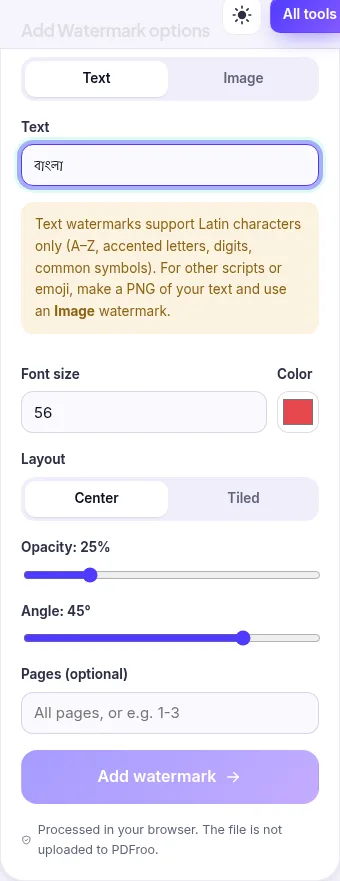
| Text | Up to 80 characters | Latin letters, accented letters, digits and common symbols only. Bangla text showed a warning and the Add button stayed disabled. |
| Font size / Color | 8–200 pt, any colour | Default 56 pt red. |
| Layout | Center or Tiled | Tiled repeats the text across the page in offset rows. |
| Image size | 10–100% of page width | Image mode only; the image is centred. |
| Opacity | 5–100% | 15–25% is readable without hiding the content. |
| Angle | −90° to 90°, 5° steps | 45° is the default diagonal. |
| Pages | Blank = all pages, or a range like 1-3 | Commas also work, e.g. 2, 5-7. |
There is no position control: text and images are always centred (or tiled), not placed in a corner. If you need a small mark in a corner, an image watermark at 10–15% width is the closest option, and it will still be centred.
DRAFT.3-6, the sections that are not final.yourfile-watermarked.pdf.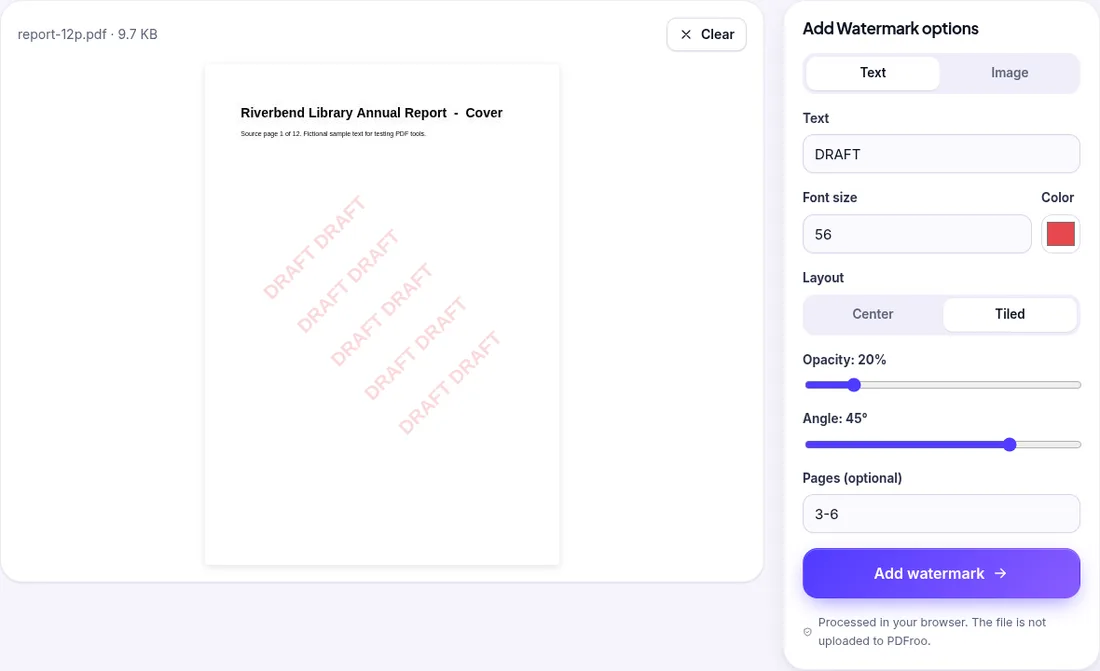
| Date | 22 October 2026 |
|---|---|
| Environment | Google Chrome 155 (headless) on Linux x86_64, desktop viewport 1280×900, PDFroo build of 22 October 2026 |
| Input | Fictional 12-page report (9.7 KB) with a landscape page 4, 12 bookmarks and one internal link |
| Output | 12 pages, 10.0 KB. Only pages 3–6 carried the watermark, including the landscape page; pages 1–2 and 7–12 were unchanged. The bookmarks and internal link were kept. |
| Text layer | pdftotext found the watermark letters on pages 3–6, so the watermark is selectable, searchable text and can be removed with an editor. |
| Non-Latin text | Typing Bangla showed “Text watermarks support Latin characters only…” and blocked the run. The tool suggests using a PNG of your text as an image watermark instead. |
More on how we test is in our testing methodology.
Switch to Image, choose a PNG with a transparent background, set the size and keep the opacity low (10–20%). JPG logos have a solid background box, which shows as a pale rectangle. The image is centred and rotated by the same angle setting, so set the angle to 0° for an upright logo.
For long documents, adding page numbers helps reviewers refer to the draft pages.
Choose a page number format, skip a cover page, set a start number and check landscape or merged pages, with a tested walkthrough of PDFroo.
Type on a PDF, cover areas with white boxes or highlight text. Tested: the white box hides text visually, but the covered words remain in the file.
Trim white margins or scanner edges from one page or all pages. Tested: the crop box changes what is shown, but the cut-off text is still inside the file.
Plan a page range, extract non-consecutive pages into a new PDF, and check that confidential pages, bookmarks and links did not come along. Tested example.
Put a document packet in the right order with page thumbnails: move, rotate, duplicate or delete pages, fix a merged file, and check what changes.
Merge several scans into one PDF, then fix upside-down pages, remove blank backs and check mixed page sizes. A tested two-step workflow, with its limits.