

Password Protect a PDF Before Sharing (AES-256)
Add an open password with AES-256 encryption and optional print, copy and edit restrictions. Tested and verified, with the limits of permission flags explained.

A bank statement or payslip that asks for a password every time is tedious to archive or forward to your accountant. If you know the password, Unlock PDF saves a copy without it. It is not a password cracker: without the correct password it cannot open the file, and it should only be used on documents you are allowed to access.
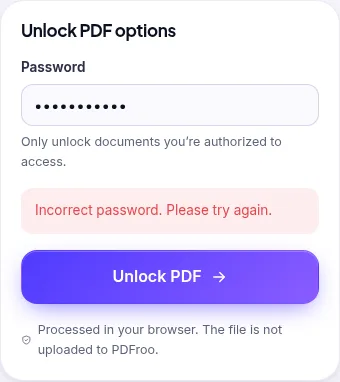
Some PDFs open without asking for anything, but your viewer will not let you print or copy from them. They have an “owner” password that sets restrictions, and no password to open. On 28 October 2026 we made such a file for testing (our fictional 12-page report, AES-256, printing and editing restricted, no open password) and loaded it into Unlock PDF on the live site.
We left the password field empty, as the placeholder suggests (“Leave empty if it only has restrictions”), and pressed Unlock PDF. The result screen said “Password removed”, and the 8.7 KB output was no longer encrypted, still had all 12 pages and all 12 bookmarks. Only do this for files you are entitled to print or edit; the restrictions were put there by whoever made the document.
We also loaded an ordinary, unencrypted PDF. The tool showed “This PDF isn’t encrypted – it has no password to remove.” and did not produce a file. If you see this, the file is already open; if your viewer still asks for a password, you may be opening a different copy.
| Date | 22 October 2026 |
|---|---|
| Environment | Google Chrome 155 (headless) on Linux x86_64, desktop viewport 1280×900, PDFroo build of 22 October 2026 |
| Test file | The AES-256 file produced in our Protect PDF test |
| Runs | Wrong password, then the correct one |
| Results | Error message shown for the wrong password; unlocked copy not encrypted, 12 pages, 12 bookmarks |
| Network | The browser made no request that carried the file: the only requests during processing were same-origin page prefetches and local blob: URLs. |
| Re-test | 28 October 2026 on the live site: restrictions-only AES-256 file unlocked with an empty password (not encrypted, 12 pages, 12 bookmarks); unencrypted file refused with an explanatory message |
During these runs the only POST requests went to the site’s analytics endpoints (Cloudflare Web Analytics and Google Analytics); no request went to a PDFroo processing server, and the result was produced in the browser.
We checked every output with pypdf, pdfinfo and pdftotext, and recorded every network request the page made while the file was processed. See our tool testing methodology.
Add an open password with AES-256 encryption and optional print, copy and edit restrictions. Tested and verified, with the limits of permission flags explained.
Find pages that repeat after combining PDFs, delete the extra copies, and check the final page count. Tested with overlapping files and a re-scan.
Turn a phone photo of your handwritten signature into a clean, see-through signature on a PDF. We tested six photos: what worked and what left a box.
Prepare a PDF for long-term archiving by checking text, page order, metadata, forms, compression, file naming, backups, and PDF/A requirements.
Learn why black boxes and cropping may not remove PDF data, then follow a safer workflow to redact, flatten, verify, and share sensitive files.
Make a PDF easier to read on a phone by fixing orientation, cropping wide margins, splitting long files, and preserving clear searchable text.